
International Money Transfers
Send Money Globally With Absolute Confidence.
Send Money
Globally With
Absolute Confidence.
Send money internationally with speed, flexibility, and security.
Download The App
Contact Us
Global Coverage
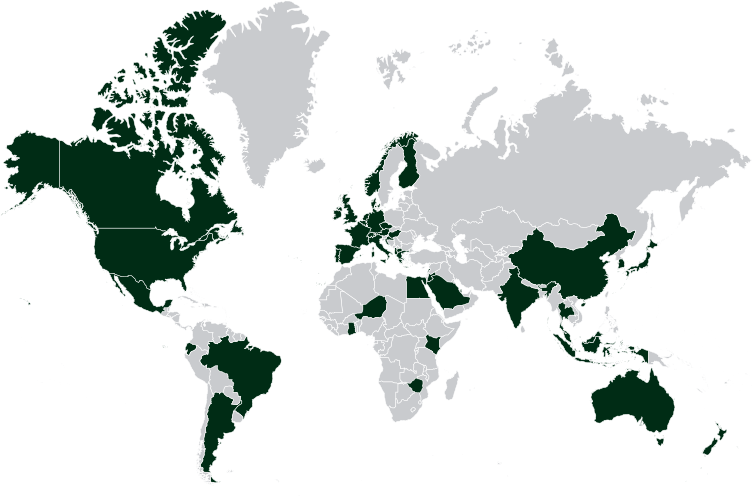
Send money easily to 200+ Countries across the globe
Secure & Trusted
Our security is based on the highest international standards.
Clear Rates. Better Value.
Competitive features provided by our service providers
Fast, Reliable Transfers
Get 2 days transfers on most major currencies.
Country Coverage
Send Money Overseas to
200+ countries
with Thawani Pay
Albania
Argentina
Australia
Austria
Bahrain
Belgium
Brazil
Czech Republic
Canada
China
Denmark
Ecuador
Egypt
Finland
France
Germany
Ghana
Greece
Hong kong
Hungary
India
Indonesia
Italy
Japan
Jordan
Kenya
Lebanon
Malaysia
Mexico
Netherlands
New Zealand
Nigeria
Norway
Portugal
Saudi Arabia
South Korea
Singapore
Spain
Thailand
Ukraine
United States
Zimbabwe
Country Coverage
Send Money Overseas to 200+ countries
with Thawani Pay
Albania
Argentina
Australia
Austria
Bahrain
Belgium
Brazil
Czech Republic
Canada
China
Denmark
Ecuador
Egypt
Finland
France
Germany
Ghana
Greece
Hong kong
Hungary
India
Indonesia
Italy
Japan
Jordan
Kenya
Lebanon
Malaysia
Mexico
Netherlands
New Zealand
Nigeria
Norway
Portugal
Saudi Arabia
South Korea
Singapore
Spain
Thailand
Ukraine
United States
Zimbabwe
Secure & Trusted
Our security is based on the highest international standards.
Clear Rates. Better Value.
Competitive features provided by our service providers
Fast, Reliable Transfers
Get 2 days transfers on most major currencies.
Global Coverage
Send money easily to 200+ Countries across the globe
Secure & Trusted
Our security is based on the highest international standards.
Clear Rates. Better Value.
Competitive features provided by our service providers
Fast, Reliable Transfers
Get 2 days transfers on most major currencies.
Global Coverage
Send money easily to 200+ Countries across the globe
Country Coverage
Send Money Overseas to 200+ countries
with Thawani Pay
Albania
Argentina
Australia
Austria
Bahrain
Belgium
Brazil
Czech Republic
Canada
China
Denmark
Ecuador
Egypt
Finland
France
Germany
Ghana
Greece
Hong kong
Hungary
India
Indonesia
Italy
Japan
Jordan
Kenya
Lebanon
Malaysia
Mexico
Netherlands
New Zealand
Nigeria
Norway
Portugal
Saudi Arabia
South Korea
Singapore
Spain
Thailand
Ukraine
United States
Zimbabwe
Get Started


Money Transfers
Done Right
Money Transfers
Done Right
Money Transfers
Done Right
The Thawani Pay app has everything you need for global money transfers.
Convert currencies, set rate alerts, and transfer money abroad with no hidden fees.
Download today!
The Thawani Pay app has everything you need for global money transfers.
Convert currencies, set rate alerts, and transfer money
abroad with no hidden fees.
Download today!
The Thawani Pay app has everything you need for
global money transfers. Convert currencies,
set rate alerts, and transfer money
abroad with no hidden fees.
Download today!
FAQ
FAQ
FAQ
Frequently Asked
Questions
Frequently Asked
Questions
Frequently Asked
Questions
How to send money from Mojab to Mojab?
From the App homepage click on ” Transfers”, Click on “Mojab to Mojab”, Select the name from your contact list to send money, Enter the amount, Your friend has received the amount
How to send money from Mojab to Mojab?
From the App homepage click on ” Transfers”, Click on “Mojab to Mojab”, Select the name from your contact list to send money, Enter the amount, Your friend has received the amount
How to send money from Mojab to Mojab?
From the App homepage click on ” Transfers”, Click on “Mojab to Mojab”, Select the name from your contact list to send money, Enter the amount, Your friend has received the amount
What countries are open for international transfers through Thawani?
Nepal, Egypt, India, Pakistan, Bangladesh, Philippines, Sri Lanka, and Indonesia
What countries are open for international transfers through Thawani?
Nepal, Egypt, India, Pakistan, Bangladesh, Philippines, Sri Lanka, and Indonesia
What countries are open for international transfers through Thawani?
Nepal, Egypt, India, Pakistan, Bangladesh, Philippines, Sri Lanka, and Indonesia
How can I make an international transfer through Thawani App?
From the homepage in Thawani, choose “International Transfers” ● click on “Register here” or “+” sign ● Finally, enter all required info and complete the transfer.
How can I make an international transfer through Thawani App?
From the homepage in Thawani, choose “International Transfers” ● click on “Register here” or “+” sign ● Finally, enter all required info and complete the transfer.
How can I make an international transfer through Thawani App?
From the homepage in Thawani, choose “International Transfers” ● click on “Register here” or “+” sign ● Finally, enter all required info and complete the transfer.
How can I add a new beneficiary for international bank transfers?
From the Thawani homepage, click “International Transfers” ● Click on “Lets add a beneficiary” and choose the country. ● Click on “Bank transfer” ● Then enter beneficiary details, and the transfer code (IFSC/SWIFT) ● Review the details before clicking on “Transfer” ● Click on “Send” icon to share it with the beneficiary
How can I add a new beneficiary for international bank transfers?
From the Thawani homepage, click “International Transfers” ● Click on “Lets add a beneficiary” and choose the country. ● Click on “Bank transfer” ● Then enter beneficiary details, and the transfer code (IFSC/SWIFT) ● Review the details before clicking on “Transfer” ● Click on “Send” icon to share it with the beneficiary
How can I add a new beneficiary to receive the bank transfer in cash?
● From the Homepage of the app, click on “International Transfers” ● Click on Lets add a beneficiary and choose the country ● Click on “Cash pickup” ● Choose the country, then add the beneficiary details ● Review the details before clicking on “Transfer” ● Click on “confirm “and export the transaction receipt with the beneficiary.
How can I add a new beneficiary to receive the bank transfer in cash?
● From the Homepage of the app, click on “International Transfers” ● Click on Lets add a beneficiary and choose the country ● Click on “Cash pickup” ● Choose the country, then add the beneficiary details ● Review the details before clicking on “Transfer” ● Click on “confirm “and export the transaction receipt with the beneficiary.
How can I edit the beneficiary information?
● From the Thawani homepage, click “International Transfers” ● Then click the three points icon beside the name of the beneficiary to display the option of “View and Edit” ● Click “Edit” to edit information and then save changes.
How can I edit the beneficiary information?
● From the Thawani homepage, click “International Transfers” ● Then click the three points icon beside the name of the beneficiary to display the option of “View and Edit” ● Click “Edit” to edit information and then save changes.
How can I know the currency fee?
● From the Thawani homepage, click “International Transfer” ● Click the currency exchange icon to display a list of countries with the exchange rates.
How can I know the currency fee?
● From the Thawani homepage, click “International Transfer” ● Click the currency exchange icon to display a list of countries with the exchange rates.
How can I track my transaction?
● From the Thawani homepage, scroll down to view the list of your recent ttransactions. ● Click “View all” to view all transactions. ● You can filter transactions and view them according to their status.
How can I track my transaction?
● From the Thawani homepage, scroll down to view the list of your recent ttransactions. ● Click “View all” to view all transactions. ● You can filter transactions and view them according to their status.
What is the IFSC Code and SWIFT CODE?
IFSC AND SWIFT CODE are international transfer codes that identify banks worldwide. It consists of a series of numbers or letters or alphabet letters.A SWIFT CODE is an identification code consisting of 8 or 11 digits and refers to the bank branch. The code is used in transferring international funds.The (IFSC) code, known as the Indian Financial System Code, consists of 11 letters and numbers and is used in transferring international funds online.
What is the IFSC Code and SWIFT CODE?
IFSC AND SWIFT CODE are international transfer codes that identify banks worldwide. It consists of a series of numbers or letters or alphabet letters.A SWIFT CODE is an identification code consisting of 8 or 11 digits and refers to the bank branch. The code is used in transferring international funds.The (IFSC) code, known as the Indian Financial System Code, consists of 11 letters and numbers and is used in transferring international funds online.
How do I find my country’s specific transfer code (SWIFT/ IFSC) ?
You can find the transfer code of your country either (SWIFT code or IFSC) by searching for it online by entering the name of the bank, region, and branch. You can also find this information by clicking on “?” the question mark while adding the bank info in Thawani App.
How do I find my country’s specific transfer code (SWIFT/ IFSC) ?
You can find the transfer code of your country either (SWIFT code or IFSC) by searching for it online by entering the name of the bank, region, and branch. You can also find this information by clicking on “?” the question mark while adding the bank info in Thawani App.
What is the minimum amount that can be transferred from Mojab to local bank accounts?
● From the Homepage of the app, click on “International Transfers” ● Click on Lets add a beneficiary and choose the country ● Click on “Cash pickup” ● Choose the country, then add the beneficiary details ● Review the details before clicking on “Transfer” ● Click on “confirm “and export the transaction receipt with the beneficiary.
What is the minimum amount that can be transferred from Mojab to local bank accounts?
● From the Homepage of the app, click on “International Transfers” ● Click on Lets add a beneficiary and choose the country ● Click on “Cash pickup” ● Choose the country, then add the beneficiary details ● Review the details before clicking on “Transfer” ● Click on “confirm “and export the transaction receipt with the beneficiary.
Are there any transfer fees from Mojab to local bank accounts?
Yes, there is a fee of 300bzan connect your bank accounts and credit cards to the app to automatically import and categorize your transactions, making spending tracking effortless.
Are there any transfer fees from Mojab to local bank accounts?
Yes, there is a fee of 300bzan connect your bank accounts and credit cards to the app to automatically import and categorize your transactions, making spending tracking effortless.
Are there any transfer fees from Mojab to local bank accounts?
Yes, there is a fee of 300bzan connect your bank accounts and credit cards to the app to automatically import and categorize your transactions, making spending tracking effortless.
How many days does it take to transfer the amount from Mojab to local bank accounts?
2 working days depending on ACH working time
How many days does it take to transfer the amount from Mojab to local bank accounts?
2 working days depending on ACH working time
Can I save the beneficiary’s account number for the future transfers?
Yes, you can save up to 5 bank account details
Can I save the beneficiary’s account number for the future transfers?
Yes, you can save up to 5 bank account details